Category Archives: Behind the Scenes

Digitizing for Exhibits

While most of my Bitstreams posts have focused on my work preserving and archiving audio collections, my job responsibilities also include digitizing materials for display in Duke University Libraries Exhibits.  The recent renovation and expansion of the Perkins Library entrance and the Rubenstein Library have opened up significantly more gallery space, meaning more exhibits being rotated through at a faster pace.

gallery2

Just in the past year, I’ve created digital images for exhibits on Vesalius’s study of human anatomy, William Gedney’s photographs, Duke Chapel’s stained glass windows, and the 1793 Yellow Fever epidemic.  I also worked with a wide range of materials spanning “books, manuscripts, photographs, recordings and artifacts that document human aspirations” for the Dreamers and Dissenters exhibit celebrating the reopening of the newly renovated David M. Rubenstein Rare Book & Manuscript Library.  The digital images are used to create enlargements and facsimiles for the physical exhibits and are also used in the online “virtual exhibits.”


Working with such a variety of media spanning different library collections presents a number of challenges and necessitates working closely with our Exhibits and Conservation departments.  First, we have to make sure that we have all of the items listed in the inventory provided by the exhibit curator.  Secondly, we have to make sure we have all of the relevant information about how each item should be digitally captured (e.g. What image resolution and file specifications?  Which pages from a larger volume?  What section of a larger map or print?)  Next we have to consider handling for items that are in fragile condition and need special attention.  Finally, we use all of this information to determine which scanner, camera, or A/V deck is appropriate for each item and what the most efficient order to capture them in is.

All of this planning and preliminary work helps to ensure that the digitization process goes smoothly and that most questions and irregularities have already been addressed.  Even so, there are always issues that come up forcing us to improvise creative solutions.  For instance:  how to level and stabilize a large, fragile folded map that is tipped into a volume with tight binding?  How to assemble a seamless composite image of an extremely large poster that has to be photographed in multiple sections?  How to minimize glare and reflection from glossy photos that are cupped from age?  I won’t give away all of our secrets here, but I’ll provide a couple examples from the Duke Chapel exhibit that is currently on display in the Jerry and Bruce Chappell Family gallery.

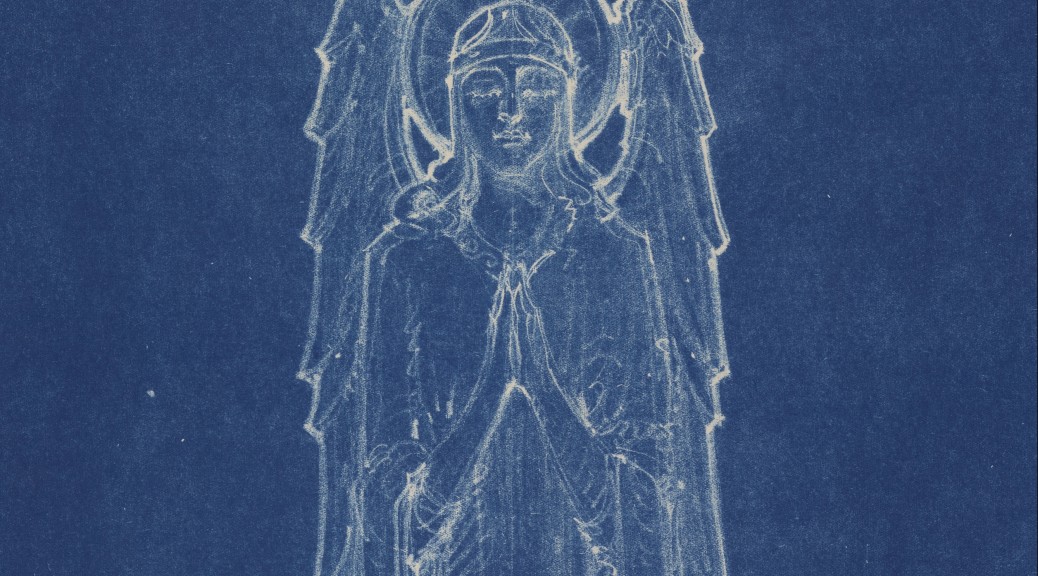
angel

This facsimile of a drawing for one of the Chapel’s carved angels was reproduced from an original architectural blueprint.  It came to us as a large and tightly rolled blueprint–so large, in fact, that we had to add a piece of plywood to our usual camera work surface to accommodate it.  We then strategically placed weights around the blueprint to keep it flattened while not obscuring the section with the drawing.  The paper was still slightly wrinkled and buckled in places (which can lead to uneven color and lighting in the resulting digital image) but fortunately the already mottled complexion of the blueprint material made it impossible to notice these imperfections.

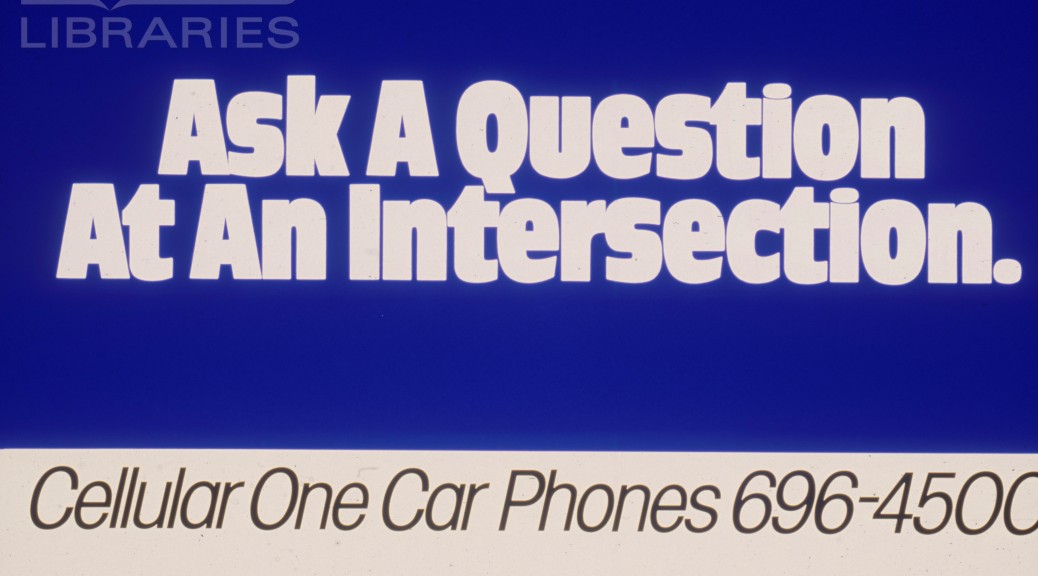
projection

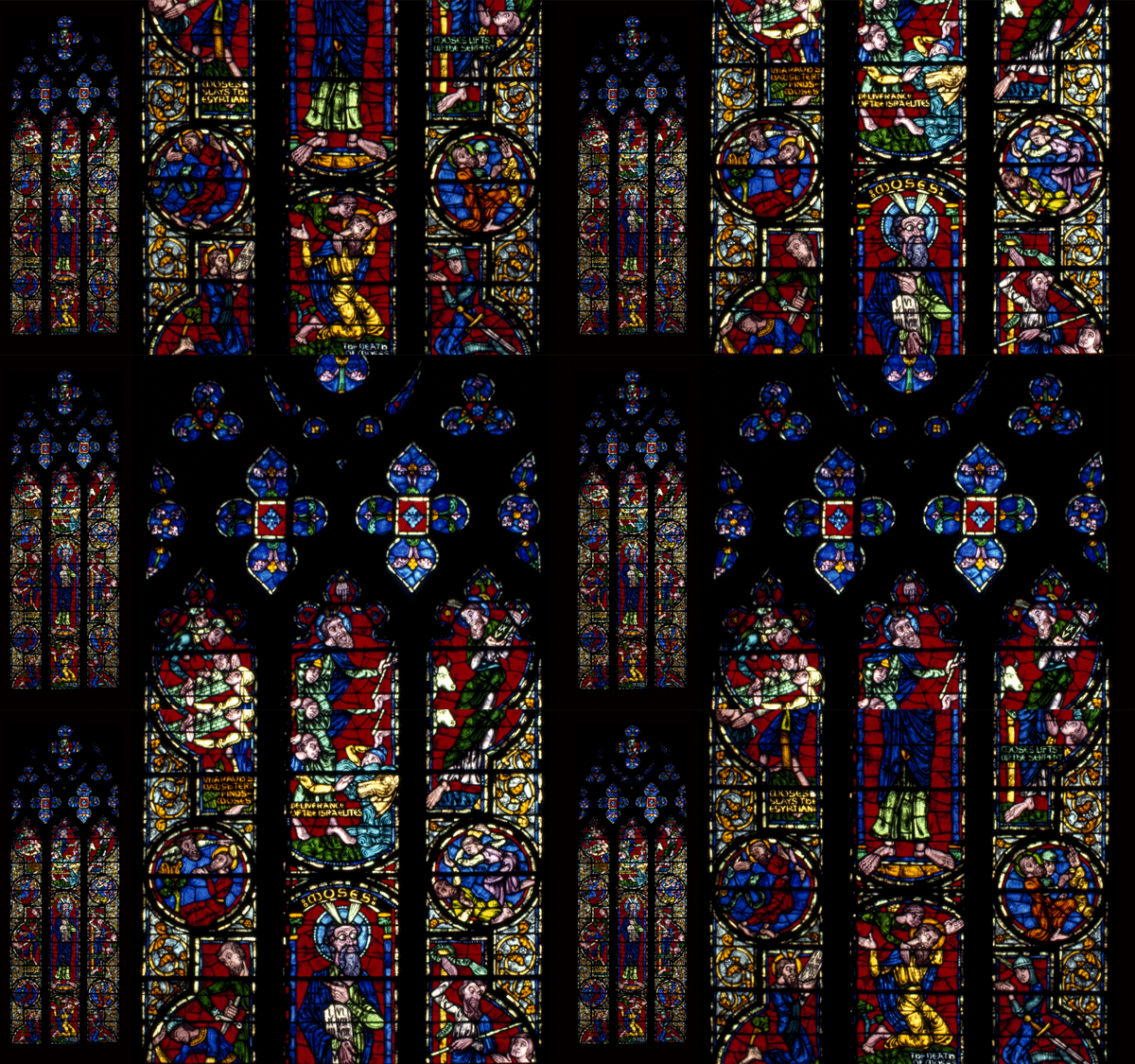
These projected images of the Chapel’s stained glass were reproduced from slides taken by a student in 1983 and currently housed in the University Archives.  After the first run through our slide scanner, the digital images looked okay on screen, but were noticeably blurry when enlarged.  Further investigation of the slides revealed an additional clear plastic protective housing which we were able to carefully remove.  Without this extra refractive layer, the digital images were noticeably sharper and more vibrant.

Despite the digitization challenges, it is satisfying to see these otherwise hidden treasures being displayed and enjoyed in places that students, staff, and visitors pass through everyday–and knowing that we played a small part in contributing to the finished product!


Survey Says: The Who, Why, What Answers you have been Waiting for!

Last Summer, Sean and I wrote about efforts we  were were undertaking with colleagues to assess the research and scholarly impact of Duke Digital Collections.   Sean wrote about data analysis approaches we took to detect scholarly use, and I wrote about a survey we launched in Spring 2015.  The goal of the survey was to gather information about our patrons and their motivations that were not obvious from Google Analytics and other quantitative data.   The survey was live for 7 months, and today I’m here to share the full results.

In a nutshell (my post last Summer included many details about setting up the survey), the survey asked users, “who are you,” “why are you here,” and “what are you going to do with what you find here?” The survey was accessible from every page of our Digital Collections website from April 30 – November 30, 2015.  We set up event tracking in Google Analytics, so we know that around 43% of our 208,205 visitors during that time hovered on the survey link.  A very small percentage of those clicked through (0.3% or 659 clicks), but 20% of the users that clicked through did answer the survey.   This gave us a total of 132 responses, only one of which seems to be 100% spam.    Traffic to the survey remained steady throughout the survey period. Now, onto the results!

Question 1:  Who are you?

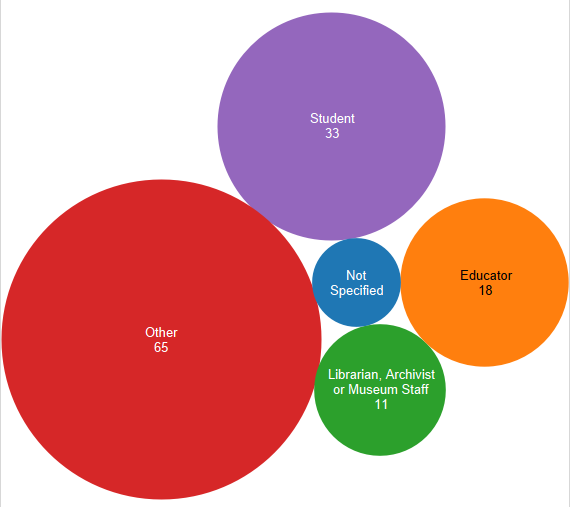
Respondents were asked to identify as one of 2 academically oriented groups (students or educators), librarians, or as “other”.   Results are represented in the bubble graphic below.  You can see that the majority of respondents identified as “other”.   Of those 65 respondents, 30 described themselves, and these labels have been grouped in the pie chart below.  It is fascinating to note that other than the handful of self-identified musicians (I grouped vocalists, piano players, anything musical under musicians) and retirees, there is a large variety of self descriptors listed.

Question 1 responses to "I am a (choose one)" (127 total)
Responses to Question 1, “I am a (choose one)” (127 total – click to enlarge)
Question 1 fill-in responses (39 total)
Question 1 fill-in responses (39 total – click to enlarge)


The results breakdown of responses to question 1 remained steady over time when you compare the overall results to those I shared last Summer.    Overall 26% of respondents identified as student (compared to 25% in July), 14% identified as educator (compared to 18% earlier), 9% identified as librarian, archivist or museum overall (exactly the same as earlier), and 51% identified as other (47% in the initial results).  We thought these results might change when the Fall academic semester started, but as you can see that was not the case.

Question 2:  Why are you here?

As I said above, our goal in all of our assessment work this time around was to look for signs of scholarly use so we were very interested in knowing if visitors come to Duke Digital Collections for academic research or for some other reason. Of the 125 total responses to question 2, personal research and casual browsing outweighed academic research ( see in the bar graph below).    Respondents were able to check multiple categories.  There were 8 instances where the same respondent selected casual browsing and personal research, 4 instances where casual browsing was paired with followed a link, 3  where academic research was tied to casual browsing, and 3 where academic research was tied to other.  Several users selected more than 2 categories, but by in large respondents selected 1 category only.  To me, this infers that our users are very clear about why they come to Duke Digital Collections.

Question 2 responses (125 total)
Question 2 responses (125 total – click to enlarge)

Respondents were prompted to enter their research topic/purpose whether it be academic, personal or other.  Every respondent that identified with other filled in a topic, 73% of personal researchers identified their topic, and 63% of academic researchers shared their topics.  Many of the topics/purposes were unique, but research around music came up across all 3 categories as did topics related the history of a local region (all different regions).  Advertising related topics also came up under academic and personal research.   Several of the respondents who chose other entered a topic that suggested that they were in the early phases of a book project or looking for materials to use in classes. To me these seemed like more academically associated activities, and I was surprised they turned up under “other”.  If I was able to ask follow up questions to these respondents, I would prompt for more information about their topic and why they defined it as academic or personal.  Similarly, if we were designing this survey again, I think we would want to include a category for academic related uses apart from official research.

The results to question 2 also remained mostly consistent since our first view of the results last Summer.    Academic research and casual browsing were tied at a 28% response rate each initially, and finished tied at a 30% response rate.  The followed a link response rate when down from 17% to an overall 11%, personal research also went down from 44% to 36% overall, and other climbed slightly from 11% to 15% overall.

Question 3:  What will you do with the images and/or resources you find on this site?

The third survey question attempts to get at the “now what” part of resource discovery.   Following trends with the first two questions, it is not surprising that a majority of the 121 respondences are oriented towards “personal” use (see bar graph below).    Like question 2, respondents were able to select multiple choices, however they tended to choose only one response.

Question 3 responses (121 total - click to enlarge)
Question 3 responses (121 total – click to enlarge)

Everyone who selected “other” did enter a statement, and of these a handful seemed like they could have fit under one of the defined categories. Several of the write-ins mentioned wanting to share items they found with family and friends assumably using methods other than social media.    Five “others” responded with potentially academic related pursuits such as “an article”, “a book”, “update a book”, and 2 class related projects.  I re-ran some numbers and combined these 5 responses with the academic publication, teaching tool, and homework respondents for a total of 55 possibly academically related answers or 45% of the total response to this question.   The new 45% “academicish” grouping, as I like to think of it, is a more substantial total than each academic topic on its own.  I propose this as an interesting way to slice and dice the data, and I’m sure there are others.

Observations

My colleagues and I have been very pleased with the results of this survey.  First, we couldn’t be more thrilled that we were successfully able to collect necessary data (any data!).    At the beginning of this assessment project, we were looking for evidence of research, scholarly and instructional use of Duke Digital Collections.  We did find some, but this survey along with other data shows that the majority of our users come to Duke Digital Collections with a more personal agenda.     We welcome the opportunity to make this kind of individual impact, and it is powerful.  If the respondents of this survey are a representative sample of our user base, then our patrons are actively performing our collections (we have a lot of music), sharing items with family, friends, and community, as well as using the collections to pursue a wide variety of interests.

While this survey data assures us that we are making individual impacts, it also reveals that there is more we can do to cultivate our scholarly and researcher audience.   This will be a long term process,  but we have made some short term progress.  As a result of our work in 2015, my colleagues and I put together a “teaching with digital collections” webpage to collect examples of instructional use and encourage more.  In the course of developing a new platform for digital collections, we are also exploring new tools that could serve scholarly researchers more effectively.     With a look towards the longer term, all of Duke University Libraries has been engaged in strategic planning for the past year, and Digital Collections is no exception.  As we develop our goals around scholarly use,  survey data like this is an important asset.

I’m curious to hear from others, what has your experience been with surveys?  What have you learned and how have you put that knowledge to use?  Feel free to comment or contact me directly! (molly.bragg at duke.edu)


Chapel Exhibit

Over the past few weeks I’ve been working on content for a new exhibit in the library; An Iconic Identity: Stories and Voices of Duke University Chapel. I’d like to share what we created and how they were built.

Chapel Kiosk

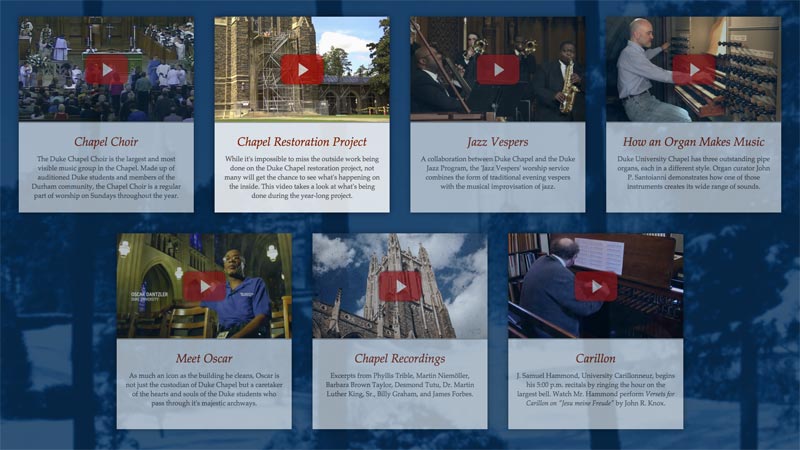
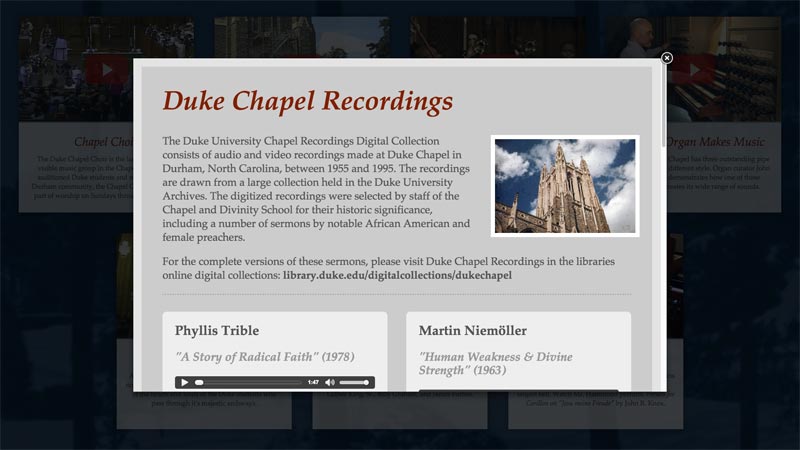
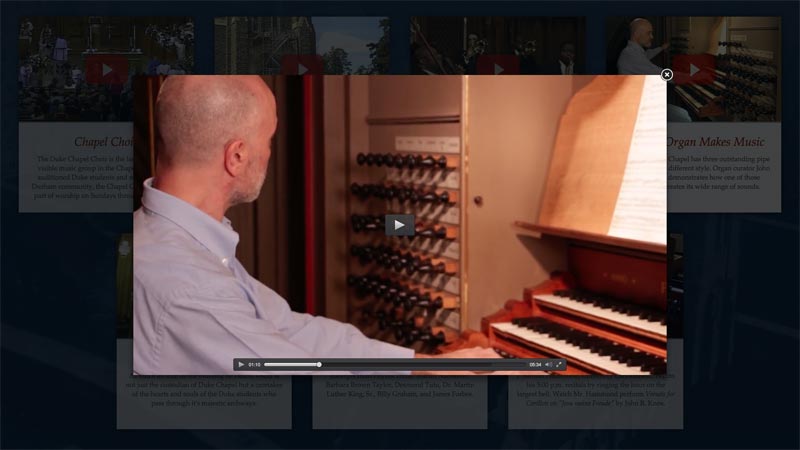
The exhibit is installed in the Jerry and Bruce Chappell Family Gallery near the main entrance to the library. There are many exhibit cases filled with interesting items relating to the history of Duke Chapel. A touchscreen lenovo all-in-one computer is installed in the corner and runs a fullscreen version of Chrome containing an interface built in HTML. The interface encourages users to view six different videos and also listen to recordings of sermons given by some famous people over the years (including Desmond Tutu, Dr. Martin Luther King Sr., and Billy Graham) – these clips were pulled from our Duke Chapel Recordings digital collection. Here are some screenshots of the interface:

chapel-kiosk-1
Home screen
Detail of audio files interface
Playing audio clips
Video player interface
Playing a video

Carillon Video

One of the videos featured in the kiosk captures the University Carillonneur playing a short introduction, striking the bells to mark the time, and then another short piece. I was very fortunate to be able to go up into the bell tower and record J. Samuel Hammond  playing this unique instrument.  I had no idea as to the physicality involved and listening to the bells so close was really interesting. Here’s the final version of the video:

Chapel Windows

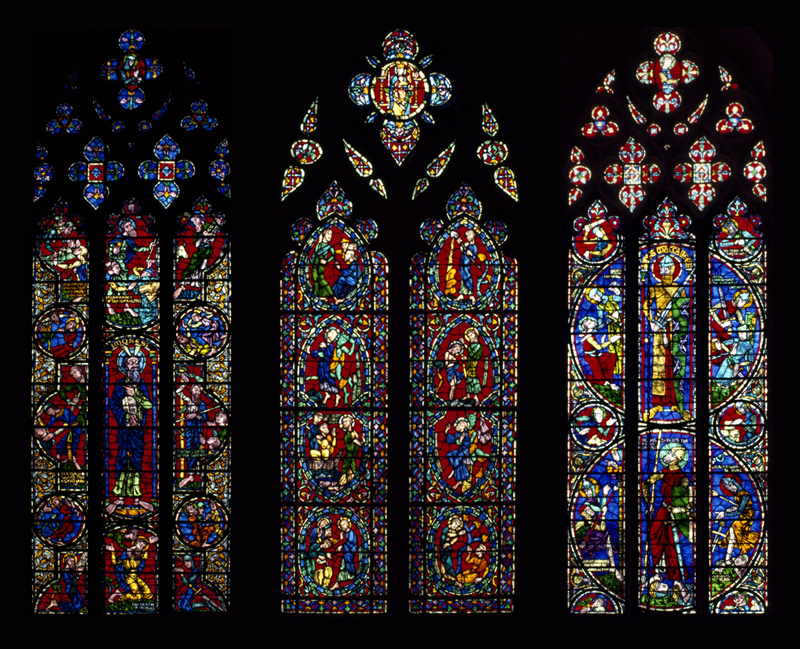
Another space in the physical exhibit features a projection of ten different stained glass windows from the chapel. Each window scrolls slowly up and down, then cycles to the next one. This was accomplished using CSS keyframes and my favorite image transition plugin, jquery cycle2. Here’s a general idea of how it looks, only sped up for web consumption:

looping_window

Here’s a grouping of three of my favorite windows from the bunch:
windows

The exhibit will be on display until June 19 – please swing by and check it out!

Multispectral Imaging in the Library

MSI setup
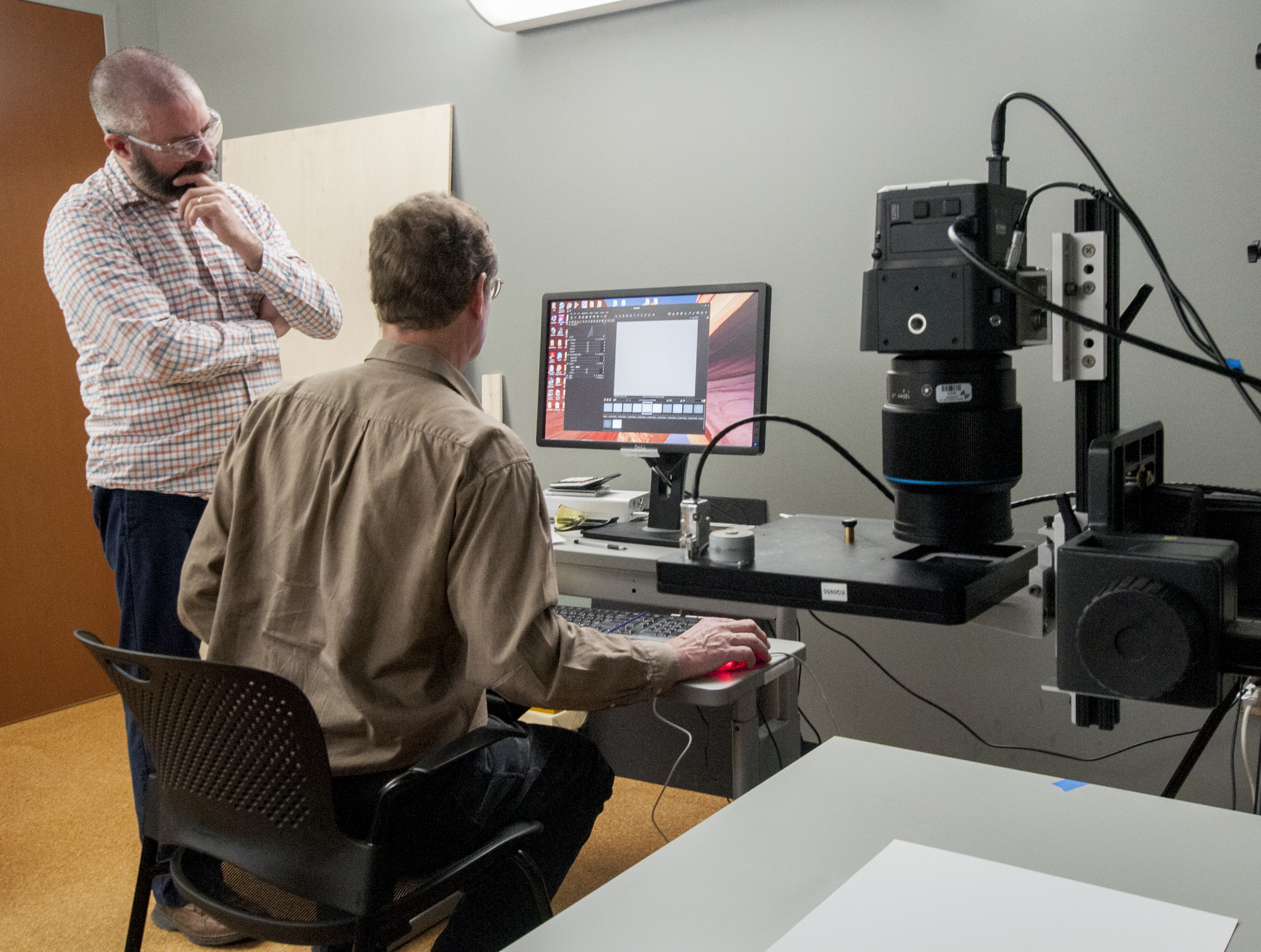
Bill Christens-Barry and Mike Adamo test the MSI system


Over the past 6 months or so the Digital Production Center has been collaborating with Duke Collaboratory for Classics Computing (DC3) and the Conservation Services Department to investigate multispectral imaging capabilities for the Library. Multispectral imaging (MSI) is a mode of image capture that uses a series of narrow band lights of specific frequencies along with a series of filters to illuminate an object.  Highly tailored hardware and software are used in a controlled environment to capture artifacts with the goal of revealing information not seen by the human eye. This type of capture system in the Library would benefit many departments and researchers alike. Our primary focus for this collaboration are the needs of the Papyri community, Conservation Services along with additional capacity for the Digital Production Center.

Josh Sosin of DC3 was already in contact with Mike Toth of R. B. Toth Associates, a company that is at the leading edge of MSI for Cultural Heritage and research communities, on a joint effort between DC3, Conservation Services and the Duke Eye Center to use Optical Coherence Tomography (OCT) to hopefully reveal hidden layers of mummy masks made of papyri. The DPC has a long standing relationship with Digital Transitions, a reseller of the Phase One digital back, which happens to be the same digital back used in the Toth MSI system. And the Conservation lab was already involved in the OCT collaboration so it was only natural to invite R. B. Toth Associates to the Library to show us their MSI system.

After observing the OCT work done at the Eye Center we made our way to the Library to setup the MSI system. Bill Christens-Barry of R. B. Toth Associates walked me through some very high-level physics related to MSI, we setup the system and got ready to capture selected material which included Ashkar-Gilson manuscripts, various papyri and other material that might benefit from MSI. By the time we started capturing images we had a full house. Crammed into the room were members of DC3, DPC, Conservation, Digital Transitions and Toth Associates all of whom had a stake in this collaboration. After long hours of sitting in the dark (necessary for MSI image capture) we emerged from the room blurry eyed and full of hope that something previously unseen would be revealed.

Ashkar-Gilson
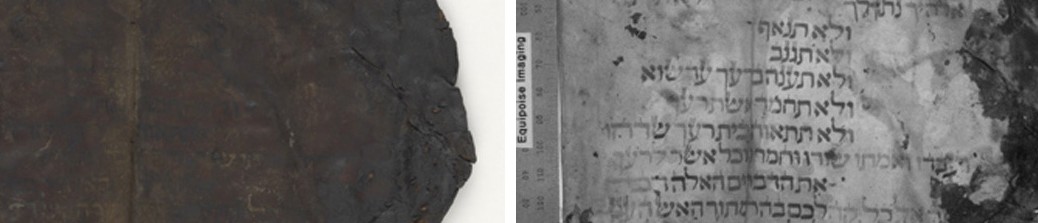
The text of this manuscript was revealed primarily with the IR narrowband light at 940 nm, which Bill enhanced.

The resulting captures are as ‘stack’ or ‘block’ of monochromatic images captured using different wavelengths of light and ultraviolet and infrared filters. Using software developed by Bill Christens-Barry to process and manipulate the images will reveal information if it is there by combining, removing or enhancing images in the stack. One of the first items we processed was Ashkar-GilsonMS14 Deuteronomy 4.2-4.23 seen below. This really blew us away.

This item went from nearly unreadable to almost entirely readable! Bill assured me that he had only done minimal processing and that he should be able to uncover more of the text in the darker areas with some fine tuning. The text of this manuscript was revealed primarily through the use of the IR filter and was not necessarily the direct product of exposing the manuscript to individual bands of light but the result is no less spectacular. Because the capture process is so time consuming and time was limited no other Ashkar-Gilson manuscript was digitized at this time.

We digitized the image on the left in 2010 and ever since then, when asked, ‘What is the most exciting thing you have digitized’ I often answer, “The Ashkar-Gilson manuscripts. Manuscripts from ca. 7th to 8th Century C.E. Some of them still have fur on the back and a number of them are unreadable… but you can feel the history.” Now my admiration for these manuscripts is renewed and maybe Josh can tell me what it says.

It is our hope that we can bring this technology to Duke University so we can explore our material in greater depth and reveal information that has not been seen for a very, very long time.

Beth Doyle, Head of Conservation Services, wrote a blog post for Preservation Underground about her experience with MSI. Check it out!

group
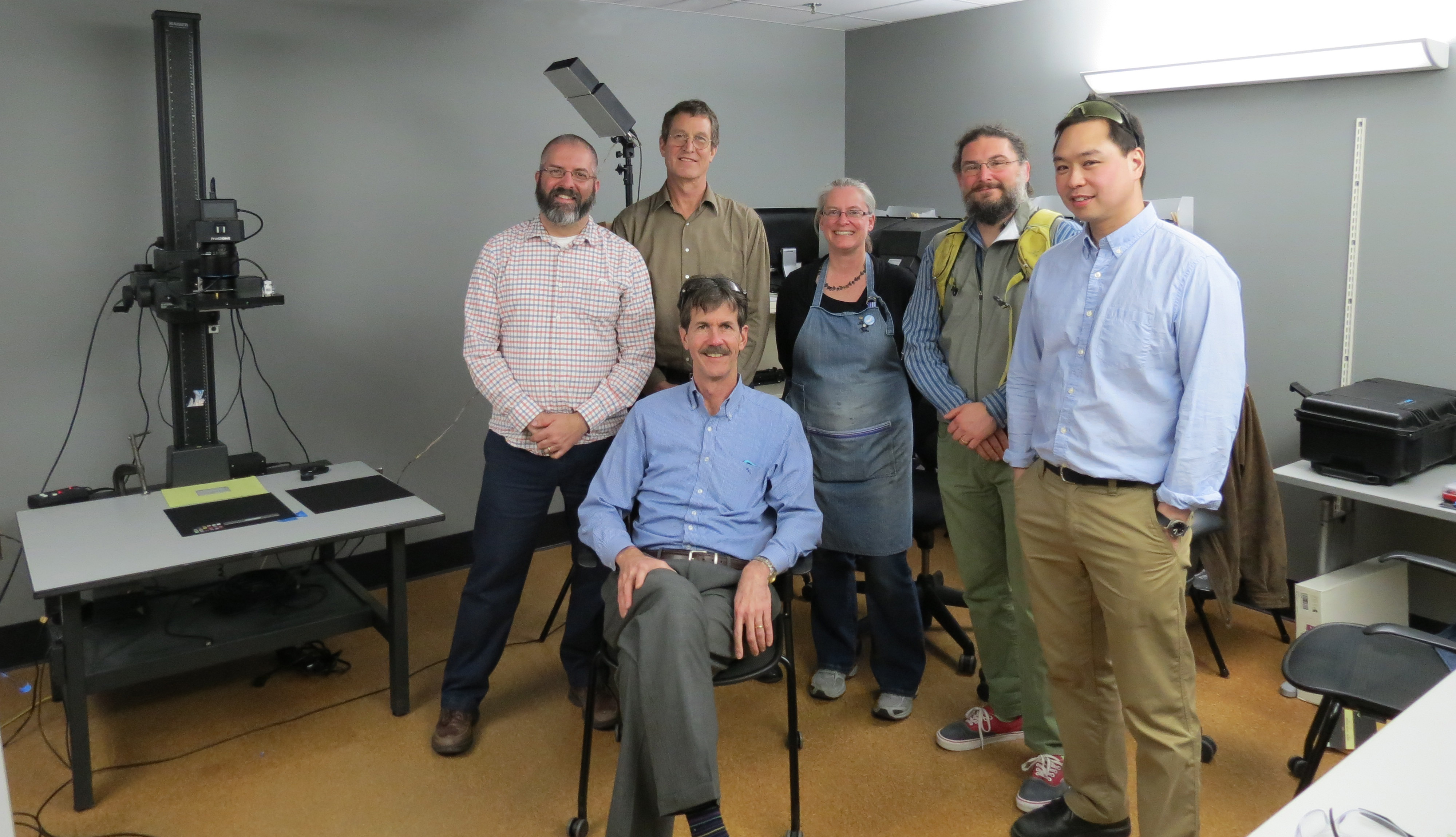
Mike Toth, Mike Adamo, Bill Christens-Barry, Beth Doyle, Josh Sosin and Michael Chan

Also, check out this article from the New & Observer.

________

Want to learn even more about MSI at DUL?

Rediscovering the Tuscarora Indians through The Trinity Archive

This is a story about how our own digital collections program led us to rediscover an amazing manuscript collection that has been at Duke since at least 1896. The Trinity Archive, now published as The Archive, is a Duke University student literary and cultural journal, first published in 1887 while the college was still based in Trinity, N.C. It is one of the oldest continuously-published literary magazines in the United States. Early editions of the Trinity Archive, held in the University Archives, were digitized through Duke’s digital collections program and are now available through the Internet Archive.

It turns out that the Duke University Archivist, Valerie Gillispie, enjoys reading digitized issues of the Trinity Archive. While perusing the December 1896 edition, she found an interesting article: “The Removal of the Tuscarora Indians from North Carolina.” Written by Sanders Dent, then manager of the magazine, the article aims to “arrange some facts found in the old papers of General Jeremiah Slade and, thus, preserve an interesting bit of North Carolina history for her future historian. General Slade was one of the Commissioners appointed by the Legislature in 1802 to settle the affairs of the Tuscarora Indians and from his letters we get most of the material for this sketch.” Dent’s article recounts the history of the Tuscarora in North Carolina in the eighteenth and early nineteenth century. Following the end of the Tuscarora War in 1713, many Tuscarora fled to upstate New York and joined the Iroquois Confederacy as the Sixth Nation. Those that remained in North Carolina were granted land in Bertie County, but by the late eighteenth century they too were being forced to lease their land to the whites and leave the state for New York.

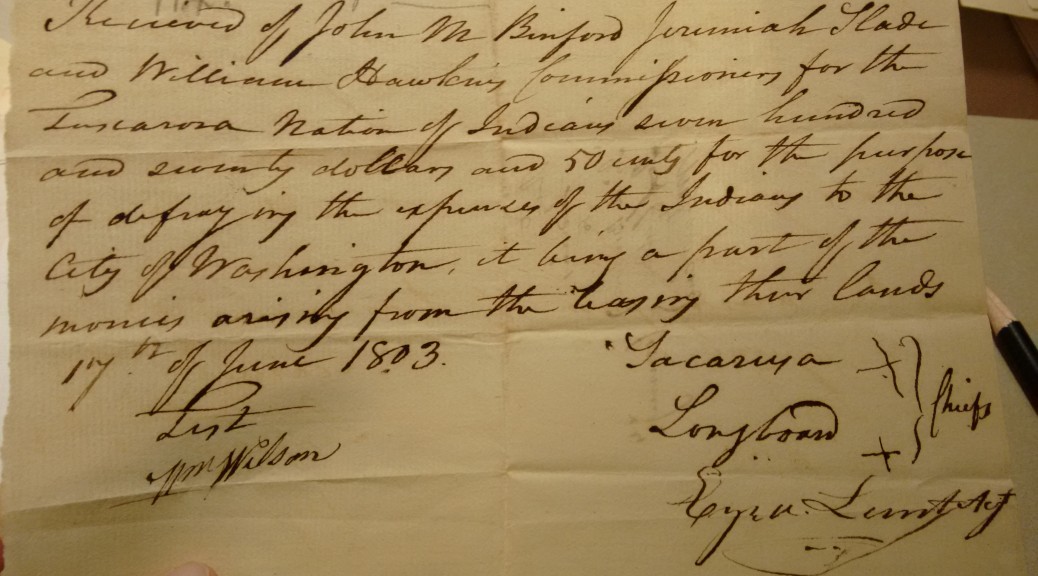
Dent’s article liberally quotes from letters held in the Jeremiah Slade Papers. Between 1803 and 1818, Slade served as an agent for the Tuscarora, managing their land leases in North Carolina and tracking money owed them by their white tenants. The papers include letters, receipts, and legal documents between Slade and the Tuscarora in Niagara, New York, with several documents signed with an X by the chiefs representing their tribe. Dent adds in a footnote that Slade’s “papers are now in the possession of the Trinity College Historical Society.”

A power of attorney sent to Jeremiah Slade in 1817, signed by Tuscarora chiefs and warriors

Thanks to Dent’s footnote, Val found that the Jeremiah Slade Papers were now held in the Rubenstein Library (but under his son’s name, as the William Slade Papers). It was an exciting connection to our Rubenstein Library ancestors, the Trinity College Historical Society. Founded by Trinity College students and professors in 1892, TCHS sought to “collect, arrange, and preserve a library of books, pamphlets, maps, charts, manuscripts, papers, paintings, statuary, and other materials illustrative of the history of North Carolina and the South.” It was a history club and a museum and a library all-in-one, and many of the library’s oldest Southern collections were acquired by TCHS before being transferred to Duke’s manuscript department in the early twentieth century. (You can read more about the TCHS here and here.)

IMG_20160204_143328161
Undated letter to Slade from the Tuscarora, asking for transfer of funds and telling him they intended to “prosecute their claims” to the N.C. Legislature

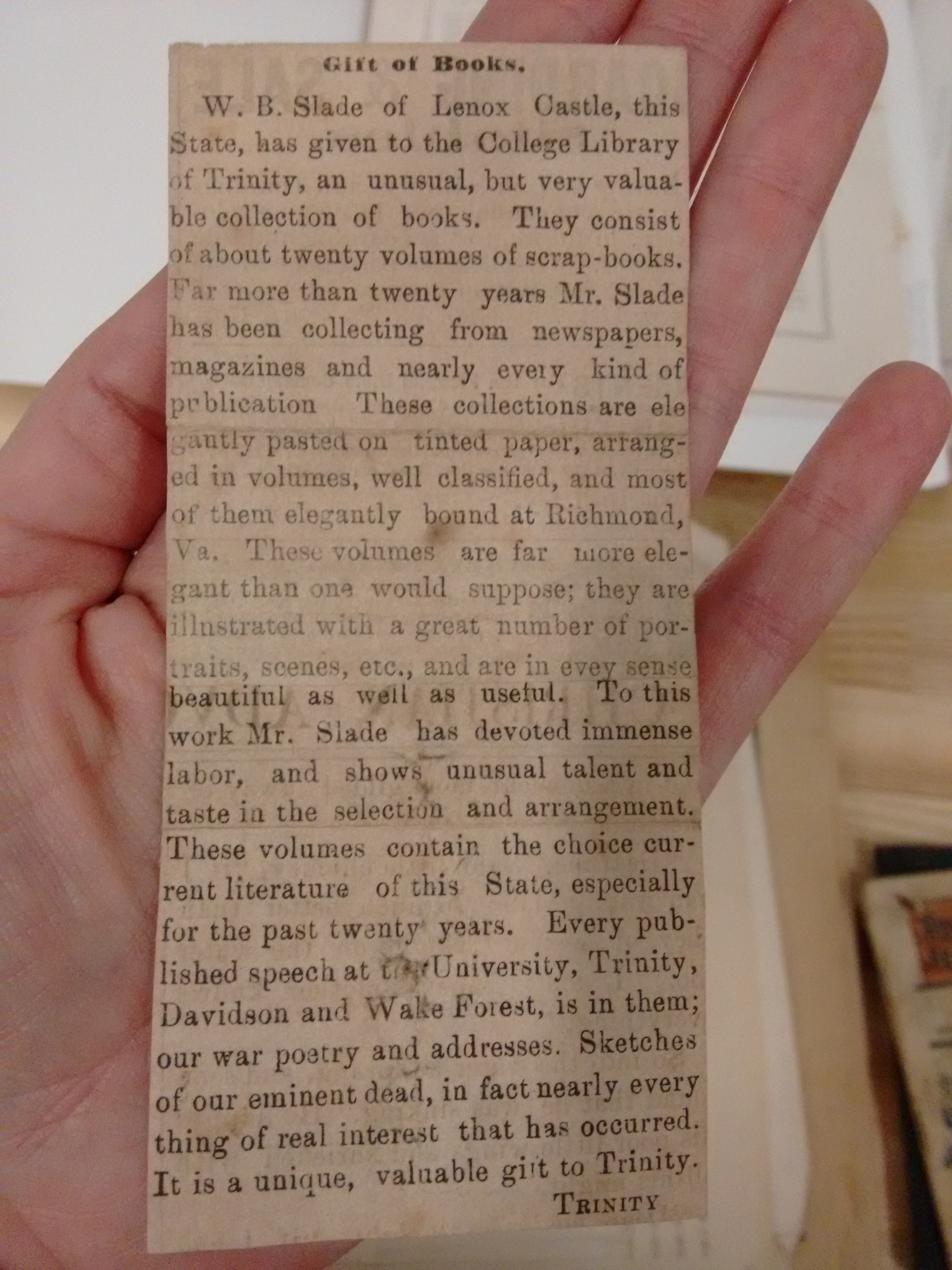
How and when the Slade Papers first came to the Trinity College Historical Society is still a mystery. The TCHS records, held by the University Archives, are incomplete for that period. A clue lies in the Slade Papers, with an 1884 item from J.D.B. Hooper, a professor at the University of North Carolina. Hooper writes that “I have consented to receive from Mr. William B. Slade, a Box of Scraps, culled by him, from newspapers, magazines, &c. with a request that I will endeavor to have them received into some library, public or private, where they may, at some future time, become useful…” He goes on to write, “I think that they may furnish materials for interesting Scrap books, when they shall fall into the hands of a person of leisure and literary taste.” Um, sure. Thanks Professor Hooper! (His papers are held at UNC.) The only other hint I have found as to the initial transfer of the Slade Papers to Duke lies in this undated clipping from the collection:

Undated clipping announcing the transfer of Slade's scrapbooks to the Trinity College Library
Undated clipping announcing the transfer of Slade’s scrapbooks to the Trinity College Library

But I can find no record of Slade scrapbooks in our accession logs or catalog records from the 1890s. I can only assume that with the scrapbooks came the box of papers that Hooper mentions. It all must have arrived sometime before 1896, when Dent wrote the Trinity Archive piece.

Since this all came to light after Val’s browsing of the Trinity Archive, we decided to revisit the Slade Family Papers, update their housing, and enhance the collection’s description to reflect contemporary descriptive standards and scholarship interests. The original catalog record had no mention of the Tuscarora, and there was no finding aid or other web presence for the collection. It was really fun to re-process such an old collection and see its contents firsthand. The Tuscarora documents, while fascinating, are only a small piece of the Slade story. The majority of the collection documents the nineteenth-century operations of the Slade plantations, farms, and fisheries around Williamston, N.C. Plus, each generation of the Slade family had many children, so there are a lot of letters between all the siblings and cousins discussing their activities, family life, education, politics, and entertainment. There are also extensive legal and financial documents, including receipts, account books, land deeds, court cases, and other items. I was amazed at the amount of documentation discussing slaves; items recording student life at different North Carolina colleges in the early nineteenth century; letters detailing life in the Confederacy during the Civil War; and materials about postwar recovery and politics, including the new business arrangements between the Slades and their former slaves, now freedmen.

Slave valuation, 1820, in the Slade Family Papers
Estate inventory including slave valuations, 1820, in the Slade Family Papers

It’s always wonderful to see what sort of research can happen as a result of digitization and online access to our collections. But the re-processing and new finding aid for the Slade Family Papers was special. It is one of those rare projects where it all came full circle: because the Trinity Archive was available online, we rediscovered this collection, and along with it, further evidence of the work of the Trinity College Historical Society. The TCHS acquired the Slade Family Papers, among many other things, over 120 years ago for future historians to study and use. We are active participants in that legacy today.

Content Galore: the SNCC Digital Gateway’s Ongoing Challenge

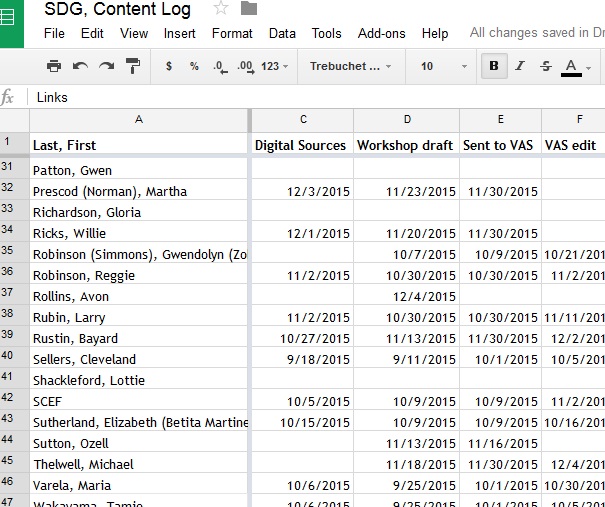
SDG_ContentLog
Google Drive content log for SNCC Digital Gateway.

So much content. Gobs of content. Never-ending ideas for more content. Content–how to produce, present, and connect it–it’s a challenge the SNCC Digital Gateway Project faces on a daily basis.

The SNCC Digital Gateway deals in two types of content.

First is the content written by the student Project Team under the direction of our SNCC Visiting Activist Scholar. This includes 600 – 700 word profiles of people, stories of events, audiovisual pieces exploring different perspectives in SNCC, and close-ups of the inner workings of SNCC as an organization. When the SNCC Digital Gateway debuts in December of 2016, it will feature over 150 profiles, 50 events, 9 audiovisual pieces, and 25 organizing SNCC pages.

Arrest record for Willie Ricks Individuals active in civil disturbances, vol. 1, ADAH

The second type of content in the SNCC Digital Gateway is the primary sources embedded within the profiles, events, and organizing SNCC pages. Each piece of written content features 6 – 8 digitized primary sources. These are items like the arrest record of SNCC field secretary Willie Ricks — “Extremely radical, militant individual”–, articles from SNCC’s newsletter, The Student Voice, or SNCC activists recounting their organizing experiences in the 1988 We Shall Not Be Moved conference at Trinity College.

Multiply the amount of written content by the number of embedded sources, and that totals well over 1500 items. And that’s only for the 2016 debut…2017 is devoted to producing more content! By the time the SNCC Digital Gateway is complete, it’s aiming to feature 300 – 400 profiles, 100 plus events, 50 organizing SNCC pages, and over 20 audiovisual pieces.

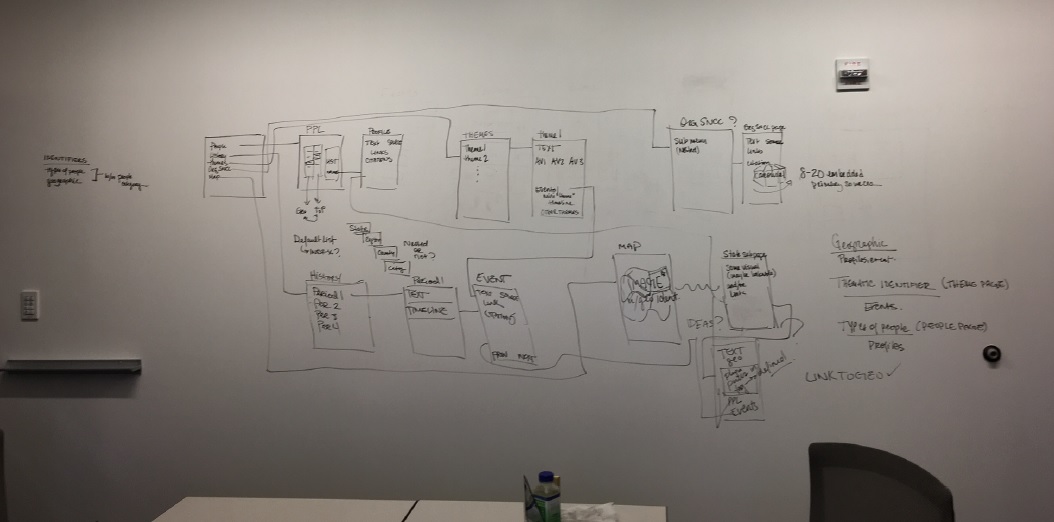
Producing so much content is a challenge in and of itself, and our resources have limits. But the SNCC Digital Gateway also needs to present these vast volumes of content in a user-friendly, intuitive way. One Person, One Vote, the pilot site to SDG, taught us a good deal about what works and doesn’t work in site architecture. We wanted the SNCC Digital Gateway to be more accessible to students and teachers, movement veterans and the general public. That meant providing users ways to explore by people and place, periods, organizations, and ideas. The Editorial Board and project staff have spent months hammering out how best to do that. We ended up with something that looks like this:

SDG_Wireframe
Wireframe for the SNCC Digital Gateway sketched on the whiteboard wall of the project room.

In mid-January, we met with Kompleks Creative, the designers of the SNCC Digital Gateway, to see what they thought was possible. Here’s an illustrative recount of the conversation about profiles and how to navigate through them using geography:

    SDG:“We want users to be able to sort through profiles by state, region, county, or city, and we’d really like them to be able to get to counties and cities directly.
    Kompleks: “How many counties are you talking about?”
    SDG: “Probably 100 or more.”
    Kompleks: “Wow. That’s not going to work.”

Don’t worry. We came to up with a good solution. But the fact that the SNCC Digital Gateway needs to handle 500 – 600 pieces of content when finished (never mind the thousands of embedded sources) is an ongoing hurdle. The design process is only beginning, so our site architecture questions are far from sorted out. But in the end, the SNCC Digital Gateway needs to bring SNCC’s history to life in a way that both channels how movement activists understood their work and is accessible and compelling for a new generation of young people, teachers, and scholars.

Good thing we’re only half a year into a three-year project.

OHMS-in’ with H. Lee Waters’ Movies of Local People

Q: How is a silent H. Lee Waters film like an oral history recording?
A: Neither is text searchable.

But, leave it to oral historians to construct solutions for access to audiovisual resources of all stripes. No mistake, they’ve been thinking about it for a long time. Purposefully, profoundly non-textual at their creation, oral histories have since their postwar genesis contended with a central irony: as research they are exploited almost exclusively via textual transcription. Oral histories that don’t get transcribed get, instead, infamously ignored. So as the online floodgates have opened and digital media recorders and players have kept pace, oral historians have seen an opportunity to grapple meaningfully with closing the gap between the text and its source, and perhaps at the same time free the interview from the expectation that it should be transcribed.

Enter OHMS (http://www.oralhistoryonline.org/). In 2013, Doug Boyd at the University of Kentucky debuted the results of an IMLS-funded project to create the Oral History Metadata Synchronizer. A free, open-source tool, OHMS empowers even the smallest oral history archive to encode its media with textual information. The OHMS editor enables the oral historian to easily create item level metadata for an oral history recording, including an index or subject list that can drop a researcher into an interview at that selected point. OHMS can also timestamp an existing transcript, so that researchers can track the audio via the text. In its short life, OHMS has demonstrated a way to bridge the great divide among oral history theorists, which reads something like this: Should our focus be the audio or the transcript?

While it springs from the minds of oral historians, OHMS might more accurately be termed the Media Metadata Synchronizer. When I saw Doug’s presentation on OHMS at the Oral History Association meeting in 2013, two alternative uses immediately came to mind: OHMS had the potential to help us provide bilingual entry to the 3,500+ recordings in our Radio Haiti Collection (currently being digitzed), and it could dramatically enhance access to one of Duke’s great collections, the H. Lee Waters Films. Waters filmed his Movies of Local People in mostly smaller communities around North Carolina from 1936-1942, using silent reversal film stock. Waters’ effort to supplement his family’s income has over the intervening years become a major historical document of the state during the Great Depression. And yet as rich as the collection is, it is difficult for students, scholars, and filmmakers to find specific scenes or subjects among the thousands of two-second shots Waters put to film. Several years ago, an intern in the archive created shotlists for some of the films, but these existed independently of the films and were not terribly accurate in matching times since they were created using VHS tapes (and VHS players are notorious for displaying incorrect times). OHMS would give us the opportunity to update the shotlists we had and create some new ones, linking description to precise points within the films.

Implementing OHMS at Duke Libraries was a pleasure, mostly because I had the opportunity to work with my colleagues in Digital Projects and Production Services, an outstanding team that can do amazing things with our equally amazing archival resources. Recognizing the open-source spirit of OHMS, Sean Aery, Will Sexton, and Molly Bragg immediately saw how the system could help us get deeper into the Waters films without having to build out a complex infrastructure (or lay out lots of cash). And so, when the H. Lee Waters website went live last year with 35 hours of mostly undescribed digital video (although we did post those older shotlists too, where we had them), it was generally agreed that a phase two would happen sooner rather than later and include a pilot for OHMS shotlists. Rubenstein Audiovisual Intern Olivia Carteaux worked diligently through the spring to normalize existing shotlists and create new ones where possible. This necessitated breaking down the descriptive data we had into spreadsheets, so we could then “crosswalk” the description into the OHMS xml file that is at the heart of the system.

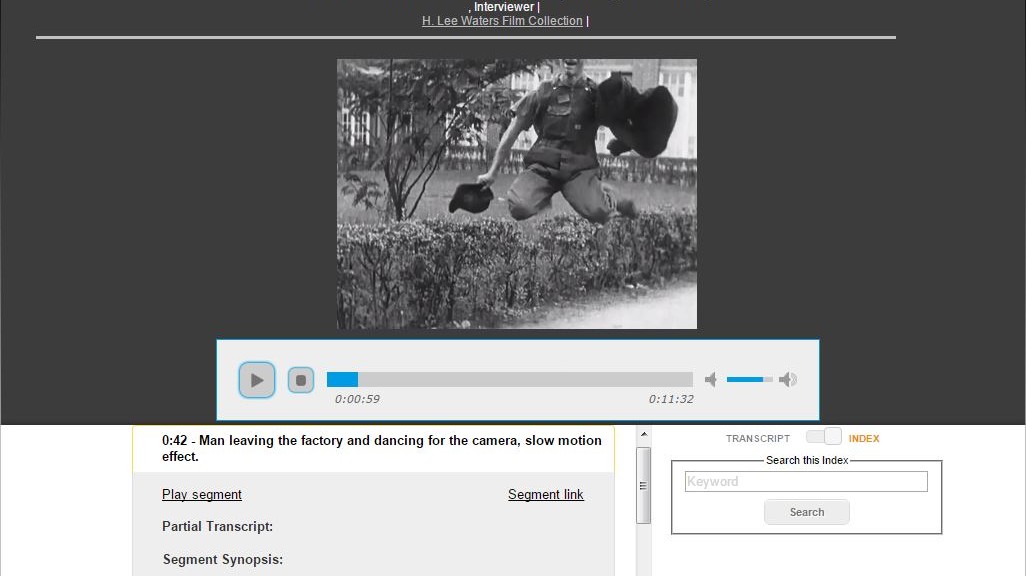
While the OHMS index viewer allows for metadata including title or description, partial transcript, segment synopsis, keywords, subjects, GPS coordinates and a link to a map, we concentrated on providing a descriptive sentence as the title and, where it was easy to find, the location of the action.

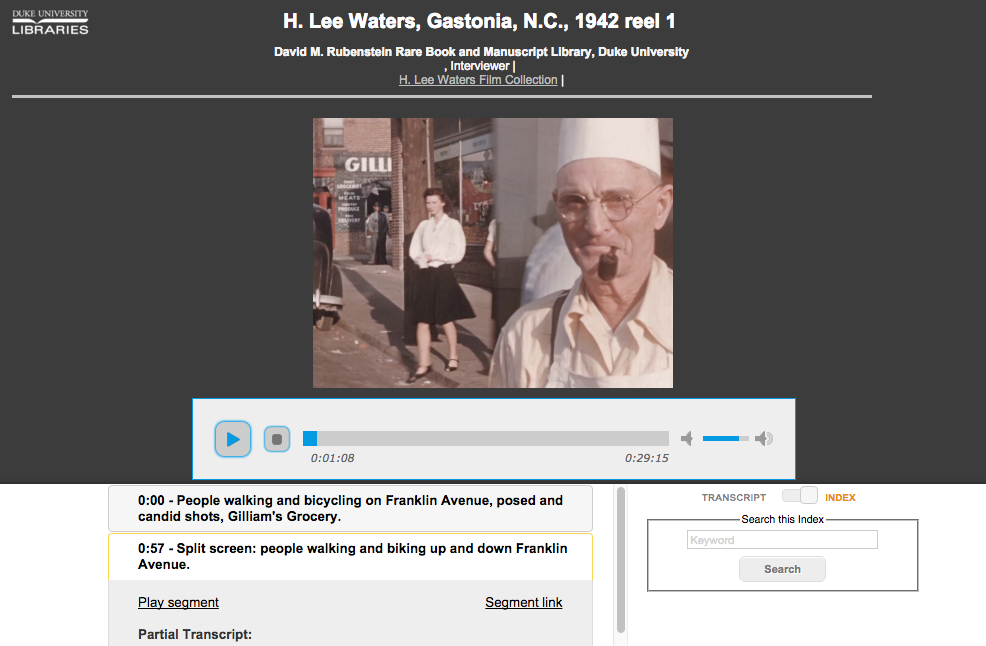
The OHMS interface in action

While on the face of it generating description for the H. Lee Waters films might seem fairly straightforward, we found a number of challenges in describing his silent moving images. For starters, given Waters’ quick edits, what would adequate frequency of description look like? A new descriptive entry at every cut would be extremely unwieldy. At the same time we recognized that without a spoken or textual counterpart to the image, every time we chose not to describe would deprive potential users of a “way in.” We settled on creating entries whenever the general scene or action changed; for instance, when Waters shifts from a scene on main street to one in front of a mill or school, or within the scene at a school when the action goes from schoolyard play to the pledge of allegiance. Sometimes the shifts are obvious, other times they are more subtle, so watching the action with a deep focus is necessary. We also created new entries whenever Waters created a trick shot, such as a split screen, a speed up or slow down of the action, a reverse shot, or a masking shot. Additionally, storefront signs, buildings, and landmarks also became good places to create entries, depending on their prominence; for these, too, we attempted to create GPS coordinates where we could easily do so.

Our second challenge was how much to invest in each description. “A picture is worth a thousand words” and “every picture tells a story” sum up much of the Waters footage, but brevity was of value to the workflow. One sentence, which did not have to be properly complete — a sort of descriptive bullet point — was decided on as our rule of thumb. In the next phase of this process I hope to use the keywords field more effectively, but that requires a controlled vocabulary, which brings me to our third challenge: normalizing description was the most difficult single piece of describing the films. Turns out there’s not a lot of library-based methodology for describing moving images, although there are general recommended approaches for describing images for the visually impaired. Then, of course, there’s the difficulty in deciding how to represent nuanced factors such as race, ethnicity, class, and gender. It is clear that in the event we undertake to create shotlists for all the Waters films, the first order of business will be to create a thesaurus of terms, to provide consistent description across the films.

When we felt like we had enough transformed shotlists for a pilot OHMS project for the Waters website, the OHMS player was loaded onto a server and the playlists uploaded. Links to the 29 shotlists were then placed below the video windows on their respective pages. To access the video and synchronized description, simply click on the link that says “Synchronized Shot List.” In this initial run we’re hoping to upload about 20 more shotlists, and at that point take a breath and see how we can improve on what we’ve accomplished. Given the challenges of presenting audiovisual resources online, there’s never really a “done,” only steady improvement. OHMS has provided what I believe is a clear step forward on access to the Waters films, and has the potential to help us transform other audiovisual collections into deeply mined treasures of the archive.

Post contributed by Craig Breaden, Audiovisual Archivist, Rubenstein Library

Digital Projects and Production Services’ “Best Of” List, 2015

Its that time of year when all the year end “best of” lists come out, best music, movies, books, etc.  Well, we could not resist following suit this year, so… Ladies in gentlemen, I give you in – no particular order – the 2015 best of list for the Digital Projects and Production Services department (DPPS).

Metadata!
Metadata!

Metadata Architect
In 2015, DPPS welcomed a new staff member to our team; Maggie Dickson came on board as our metadata architect! She is already leading a team to whip our digital collections metadata into shape, and is actively consulting with the digital repository team and others around the library.  Bringing metadata expertise into the DPPS portfolio ensures that collections are as discoverable, shareable, and re-purposable as possible.

An issue of the Chronicle from 1988

King Intern for Digital Collections
DPPS started the year with two large University Archives projects on our plates: the ongoing Duke University Chronicle digitization and a grant to digitize hundreds of Chapel recordings.  Thankfully, University Archives allocated funding for us to hire an intern, and what a fabulous intern we found in Jessica Serrao (the proof is in her wonderful blogposts).  The internship has been an unqualified success, and we hope to be able to repeat such a collaboration with other units around the library.


dukeandsonsTripod 3
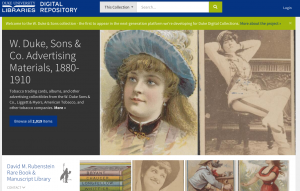
Our digital project developers have spent much of the year developing the new Tripod3 interface for the Duke Digital Repository. This process has been an excellent opportunity for cross departmental collaborative application development and implementing Agile methodology with sprints, scrums, and stand up meetings galore!  We launched our first collection not the new platform in October and we will have a second one out the door before the end of this year.   We plan on building on this success in 2016 as we migrate existing collections over to Tripod3.

Repository ingest planning
Speaking of Tripod3 and the Duke Digital Repository, we have ingesting digital collections into the Duke Digital Repository since 2014.  However, we have a plan to kick ingests up a notch (or 5).  Although the real work will happen in 2016, the planning has been a long time coming and we are all very excited to be at this phase of the Tripod3 / repository process (even if it will be a lot of work).   Stay tuned!

DCcardfrontDigital Collections Promotional Card
This is admittedly a small achievement, but it is one that has been on my to-do list for 2 years so it actually feels like a pretty big deal.  In 2015, we designed a 5 x 7 postcard to hand out during Digital Production Center (DPC) tours, at conferences, and to any visitors to the library.   Also, I just really love to see my UNC fan colleagues cringe every time they turn the card over and see Coach K’s face.  Its really the little things that make our work fun.

New Exhibits Website
In anticipation of opening of new exhibit spaces in the renovated Rubenstein library, DPPS collaborated with the exhibits coordinator to create a brand new library exhibits webpage.  This is your one stop shop for all library exhibits information in all its well-designed glory.

Aggressive cassette rehousing procedures

Audio and Video Preservation
In 2014, the Digital production Center bolstered workflows for preservation based digitization.  Unlike our digital collections projects, these preservation digitization efforts do not have a publication outcome so they often go unnoticed.  Over the past year, we have quietly digitized around 400 audio cassettes in house (this doesn’t count outsourced Chapel Recordings digitization), some of which need to be dramatically re-housed.
On the video side, efforts have been sidelined by digital preservation storage costs.  However some behind the scenes planning is in the works, which means we should be able to do more next year.  Also, we were able to purchase a Umatic tape cleaner this year, which while it doesn’t sound very glamorous to the rest of the world, thrills us to no end.
Revisiting the William Gedney Digital Collection
Fans of Duke Digital Collections are familiar with the current Gedney Digital Collection. Both the physical and digital collection have long needed an update.  So in recent years, the physical collection has been reprocessed, and this Fall we started an effort to digitized more materials in the collection and to higher standards than were practical in the late 1990s.
DPC's new work room
DPC’s new work room

Expanding DPC
When the Rubenstein Library re-opened, our neighbor moved into the new building, and the DPC got to expand into his office!   The extra breathing room means more space for our specialists and our equipment, which is not only more comfortable but also better for our digitization practices.  The two spaces are separate for now, but we are hoping to be able to combine them in the next year or two.


2015 was a great year in DPPS, and there are many more accomplishments we could add to this list.  One of our team mottos is: “great productivity and collaboration, business as usual”.  We look forward to more of the same in 2016!